Playlist Extractor [iOS/Android App]
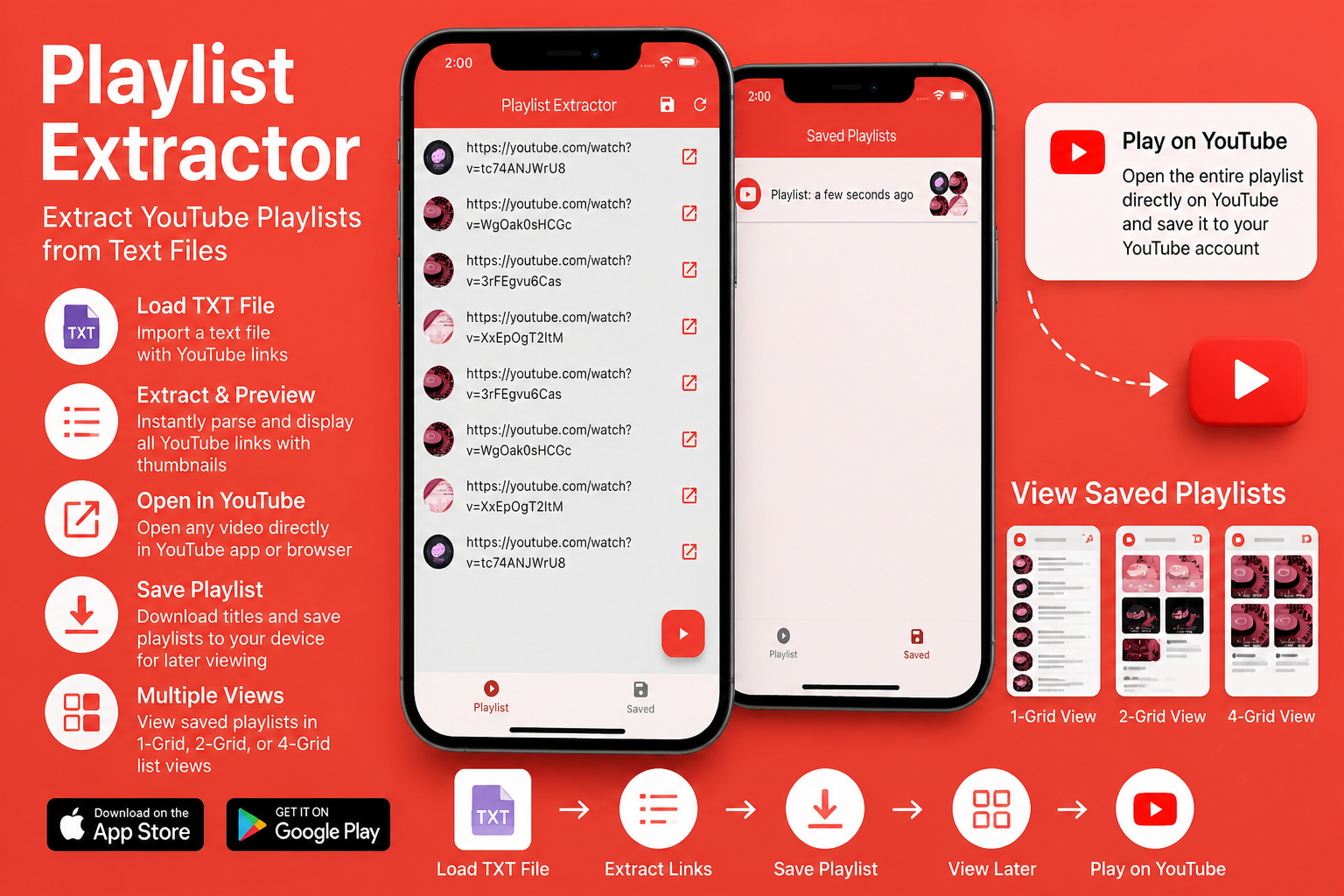
Playlist Extractor – Convert Video Links into Organized Playlists on iPhone and Android
Convert lists of video links into organised playlists with Playlist Extractor. Import TXT files, save playlists locally, and play videos individually or continuously.
Playlist Extractor – Turn Lists of Video Links into Playable Playlists
Playlist Extractor – Turn Lists of Video Links into Playable Playlists
Have you ever collected dozens—or even hundreds—of video links inside a text file and wished there was an easier way to organise and play them?
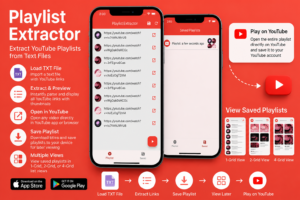
Playlist Extractor is a simple yet powerful mobile application that converts a plain text file containing video links into an organised playlist. Instead of opening every link manually, the app automatically creates a browsable playlist that you can save locally and play whenever you want.
Available for both iPhone and Android, Playlist Extractor is designed for users who regularly collect video links for music, tutorials, educational content, travel videos, podcasts, and much more.
Download Playlist Extractor
iPhone (App Store)
https://apps.apple.com/in/app/playlist-extractor/id6627335200
Android (Google Play)
https://play.google.com/store/apps/details?id=playlist.extractor.mk117.dev
Official Portfolio
https://apps.mk117.dev/PlaylistExtractor
Why Use Playlist Extractor?
Many users save video URLs in:
- TXT files
- Notes
- Emails
- Documents
- Cloud storage
- Shared playlists
While this works, opening each video individually quickly becomes time-consuming.
Playlist Extractor automates this process by transforming those links into a structured playlist that is much easier to browse and play.
How It Works
Using Playlist Extractor is straightforward.
Step 1 – Prepare a Text File
Create or download a plain text (.txt) file containing one video link per line.
For example:
https://www.youtube.com/watch?v=...
https://www.youtube.com/watch?v=...
https://www.youtube.com/watch?v=...
Step 2 – Load the File
Tap Load TXT File.
The application imports the text file and begins processing each video link.
Step 3 – Extract Playlist Information
Playlist Extractor automatically retrieves information about each video, including its title and thumbnail.
The videos are then displayed in a clean, scrollable playlist.
Step 4 – Watch Your Videos
Once the playlist has been created, you have multiple viewing options:
- Play the complete playlist
- Open individual videos
- Browse thumbnails
- Save the playlist for later
Organise Your Favourite Videos
Playlist Extractor is useful for many different types of collections.
Examples include:
- Music playlists
- Educational courses
- Programming tutorials
- Cooking recipes
- Fitness videos
- Language learning
- Travel guides
- Documentary collections
- Personal YouTube favourites
Instead of searching through bookmarks or documents, everything is available inside one organised playlist.
Save Playlists Locally
One of the biggest advantages of Playlist Extractor is that playlists are stored directly on your device.
When you press Save, the playlist is written to your phone’s local storage rather than uploaded online.
This means:
- Faster access
- Personal organisation
- Multiple saved playlists
- No online account required
Saved playlists can be opened whenever you need them.
Browse Videos with Multiple Layouts
Everyone prefers viewing playlists differently.
Playlist Extractor includes multiple display modes so you can choose the layout that works best for your collection.
Available viewing options include:
- List View
- Single Column
- Two Columns
- Four Columns
Thumbnail-based layouts make browsing visual collections much quicker, while list view is ideal for larger playlists with longer video titles.
Play Individual Videos
Sometimes you only want to watch one specific video.
Each playlist item includes a dedicated button that opens that video individually.
This is useful when:
- Resuming a tutorial
- Watching one music track
- Sharing a single video
- Reviewing a specific lesson
Play the Entire Playlist
When you’re ready to enjoy the whole collection, simply press the floating Play button.
Playlist Extractor opens the playlist directly on the supported video platform, allowing videos to play continuously without manually opening each one.
Works with the Official Video App or a Web Browser
Playlist Extractor provides flexibility depending on how you prefer to watch videos.
Playlists can be opened using:
- The official video application (when installed)
- Your preferred web browser
This allows you to choose the viewing experience that suits your device.
Simple and Clean Interface
Playlist Extractor focuses on making playlist management easy.
The interface includes:
- Load Playlist Links
- Saved Playlists
- Playlist thumbnails
- Video previews
- Download notifications
- Playlist playback
- Individual video launching
The streamlined design keeps the focus on your content rather than unnecessary configuration.
Ideal For
Playlist Extractor is suitable for many different users.
Music Lovers
Create playlists from collections of music video links and enjoy continuous playback.
Students
Organise online lectures, university courses, and educational videos into reusable playlists.
Developers
Collect programming tutorials from multiple sources and store them in one organised place.
Travellers
Save travel documentaries, destination guides, and planning videos for upcoming trips.
Content Creators
Keep inspiration videos organised for future reference.
Key Features
Playlist Creation
- Import playlists from TXT files
- Automatically extract video information
- Generate organised playlists
Flexible Playback
- Play the complete playlist
- Launch individual videos
- Open videos in the official app
- Open videos in a web browser
Local Storage
- Save playlists on your phone
- Reopen playlists anytime
- No cloud account required
Multiple Layout Options
Choose between:
- List View
- One Column
- Two Columns
- Four Columns
Why Store Playlists Locally?
Keeping playlists on your own device offers several advantages.
- Quick access
- No online account required
- Easy organisation
- Multiple playlist collections
- Convenient offline management of playlist metadata
Because the playlists are stored locally, users maintain full control over their own collections.
A Simple Tool for Everyday Use
Playlist Extractor doesn’t try to replace video streaming platforms. Instead, it helps organise collections of video links into a format that’s easier to browse and play.
Whether you’ve gathered links from tutorials, music channels, recipes, podcasts, or educational resources, Playlist Extractor provides a simple way to transform them into reusable playlists that are always available on your mobile device.
Download Playlist Extractor Today
If you regularly collect video links and want a faster way to organise and replay them, Playlist Extractor offers a lightweight and convenient solution.
App Store (iPhone)
https://apps.apple.com/in/app/playlist-extractor/id6627335200
Google Play (Android)
https://play.google.com/store/apps/details?id=playlist.extractor.mk117.dev
Official Portfolio